Why I’m Still Bullish on GUI Agents in 2026
Why I’m Still Bullish on GUI Agents in 2026
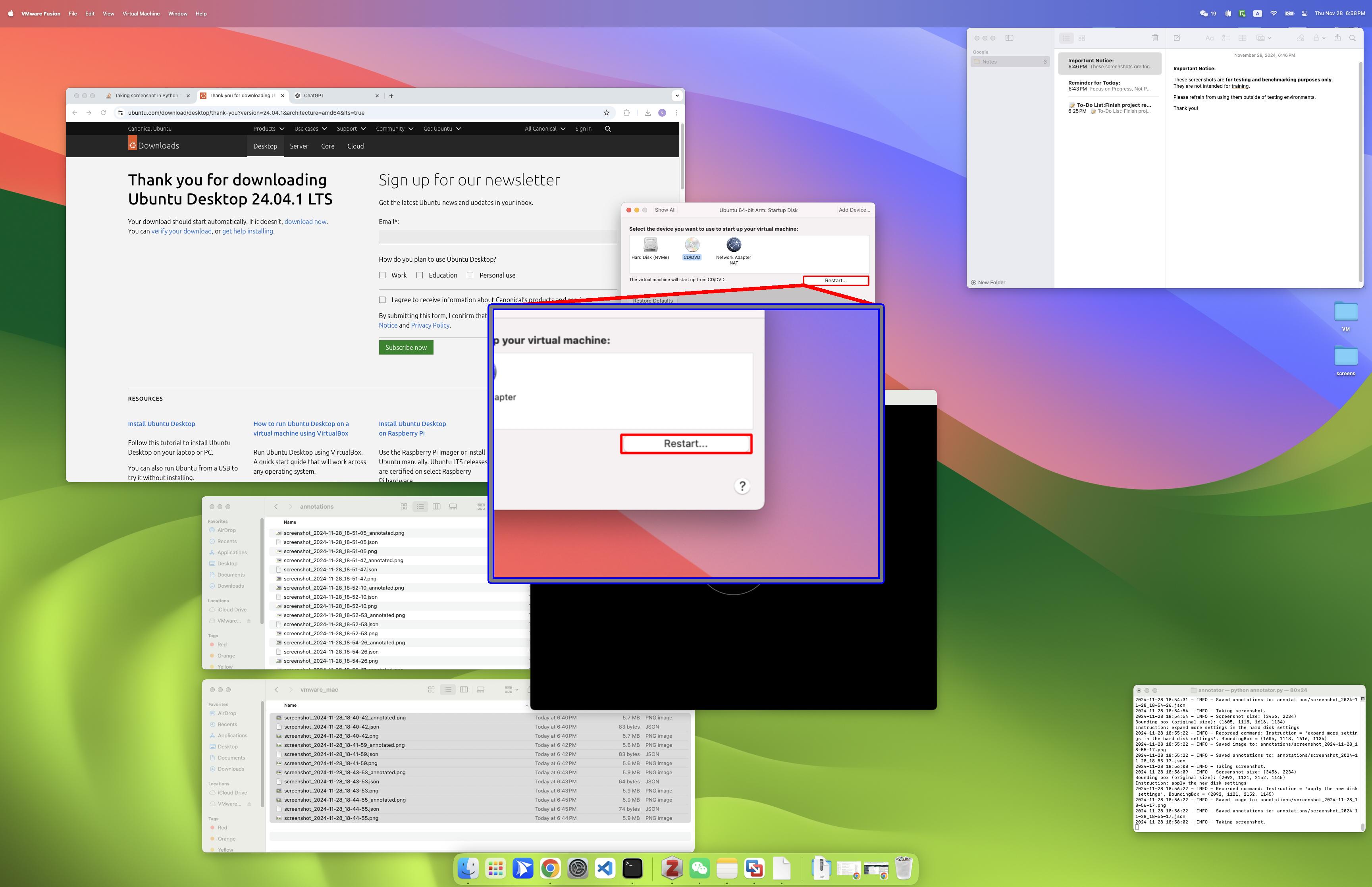
Cover:Li et al., “ScreenSpot-Pro: GUI Grounding for Professional High-Resolution Computer Use”, 2025
If you’ve been following AI over the past year, you’ve probably noticed a clear trend: 2025 was a breakout year for GUI agents. From academic benchmarks being rapidly pushed forward to big tech companies launching their own products, “AI that can operate a computer” has become one of the hottest topics.
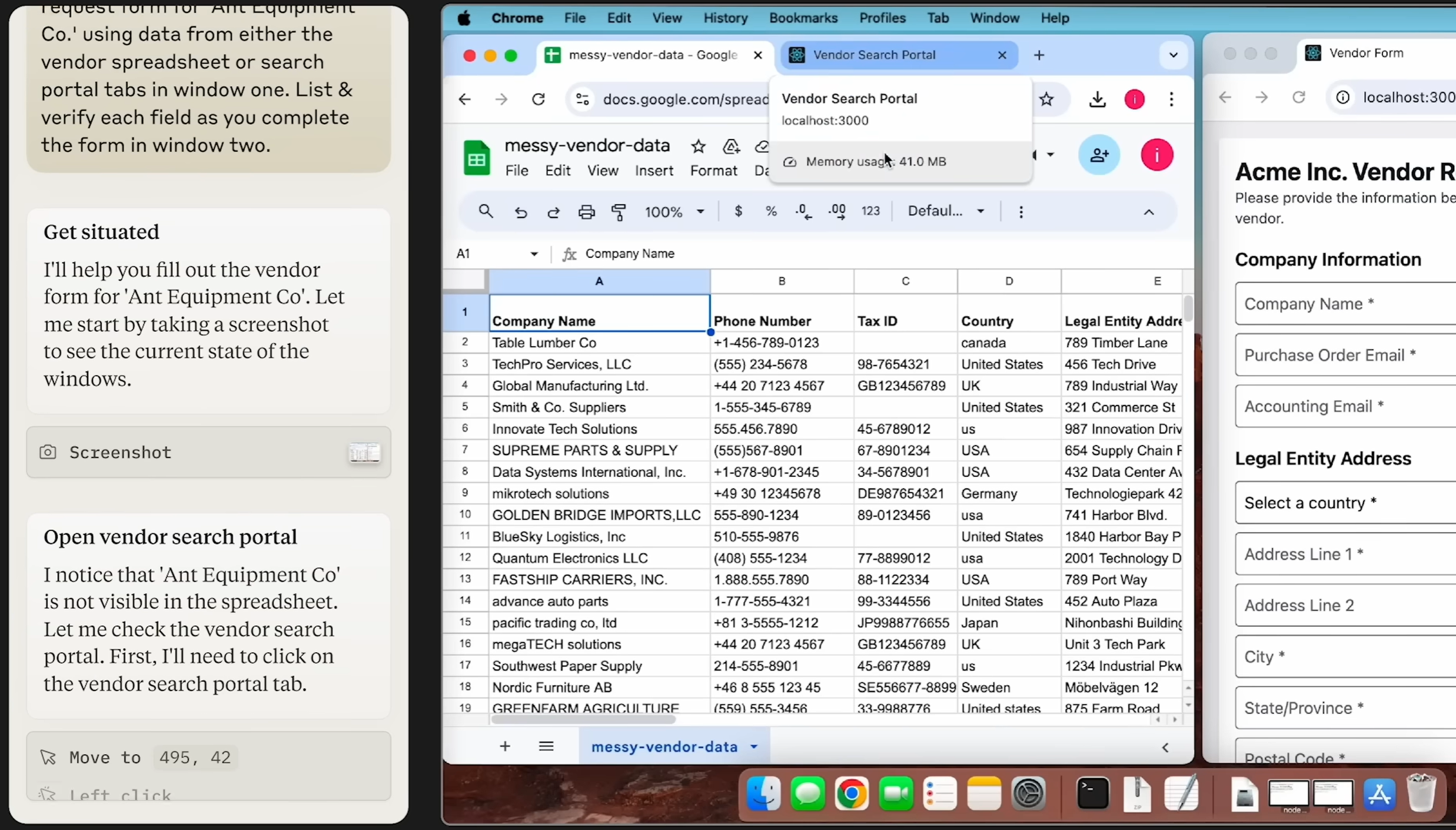 From:Claude | Computer use for automating operations
At the same time, by early 2026, a different sentiment has started to emerge in academia: “GUI agents are no longer a good direction to work on.” Typical arguments include: the field is too competitive, has been around for a while, and it’s getting increasingly hard to publish papers. On the industry side, although major companies have all shipped GUI-related products, they still haven’t generated the same buzz as some other AI directions; in China, ByteDance’s “Doubao Phone” went viral for a while, then quickly cooled down.
So, is the GUI-agent track actually “dead”?
My personal view is: I remain structurally bullish on GUI agents — more so than ever.
This article is my attempt to explain why.
A Short Preface
CLI (Command Line Interface) and GUI (Graphical User Interface) represent two milestones in the evolution of human–computer interaction. CLI relies on typing precise text commands; it has a higher learning curve but is efficient and lightweight, and has long been the domain of professionals and early computer users. GUI, by contrast, uses windows, icons, and mouse clicks to make interaction intuitive, dramatically lowering the barrier to entry and enabling computers to reach the mass market. In short, CLI is a “spell-casting” power tool, while GUI is the “remote control” of everyday computing — and both still matter today.
 From:Centralized Bash history with timestamps
A GUI agent is an intelligent system that can understand and operate graphical interfaces like a human. It perceives the screen (icons, buttons, layout) and interacts through virtual mouse and keyboard actions, essentially “watching” the screen and “using its hands” to complete tasks.
By contrast, CLI-based agents (currently the mainstream) take another path. They rely on structured text commands and standardized program interfaces, generating precise strings (for example, shell commands) to invoke system capabilities directly.
The core difference is interaction modality and adaptability. CLI agents are fast and precise, but depend on the presence of suitable command-line tools and fixed output formats. GUI agents, on the other hand, mimic human usage patterns: in principle, they can operate any software with a visual interface — including legacy systems or third‑party tools with no CLI at all — without requiring low-level integration. The trade‑off is lower execution efficiency and stronger dependence on visual models. I’ll come back to this later.
2025: The Breakout Year for GUI Agents
Before I get into my thesis, let’s briefly recap what happened in 2025.
Academia: Benchmarks Everywhere
Research on GUI agents in 2025 really exploded, with a wave of high‑quality benchmarks and papers[1]:
-
OSWorld: The first benchmark that evaluates multimodal GUI agents on real Ubuntu, Windows, and macOS environments. It covers 369 real desktop tasks spanning file management, office software, development tools, and more. Humans achieve a 72.36% success rate, while the best model at the time managed only 12.24%[2], highlighting a huge gap in GUI grounding and multi‑app coordination.
-
AndroidWorld: A dynamic benchmarking environment built on real Android emulators, providing 116 end‑to‑end tasks across 20 real apps (contacts, calendar, browser, expense trackers, etc.). It is designed to test how robust mobile GUI agents are on real devices, especially under changes in resolution, language, and system settings.
-
WorldGUI: A 2026 benchmark that constructs a large number of “from any starting state” tasks on Windows desktop environments[3]. It deliberately places target applications in non‑default states (not launched, windows occluded, non‑default tabs, etc.) to stress‑test GUI agents’ ability to recover, re‑plan, and correct errors in dynamic environments — not just follow “happy paths” on clean, static UIs.
-
ScreenSpot‑Pro: A benchmark targeting GUI grounding in professional, high‑resolution software (such as Photoshop and Premiere Pro), spanning 23 applications across five industries and three operating systems[4]. Early GUI grounding models topped out at 18.9% accuracy on this dataset[4]. Subsequent methods using visual search and region cropping pushed performance into the 40%+ range, and the latest RegionFocus approach has raised accuracy to 61.6% on ScreenSpot‑Pro[9]. That’s a big jump, but still far from “solved.”
-
FineState‑Bench: A benchmark dedicated to fine‑grained state control across desktop, web, and mobile environments[5]. It tasks GUI agents with operations such as precisely dragging sliders, selecting specific colors, and highlighting only a particular sentence. Experiments show that even the strongest current agents achieve only 32.8% overall accuracy on these fine‑grained interactions[5].
These benchmarks share one trait: they are hard. Even the most advanced multimodal models today are far below human performance, which, paradoxically, is exactly what makes this space interesting — the headroom is huge.
Industry: Big Players Enter the Arena
On the industry side, 2025 was equally intense:
- OpenAI Operator: Launched in January 2025, Operator can autonomously execute complex tasks in a browser. On challenging JavaScript-heavy sites, it reaches around 87% task success, about 58% on WebArena, and about 38% on OSWorld[1].
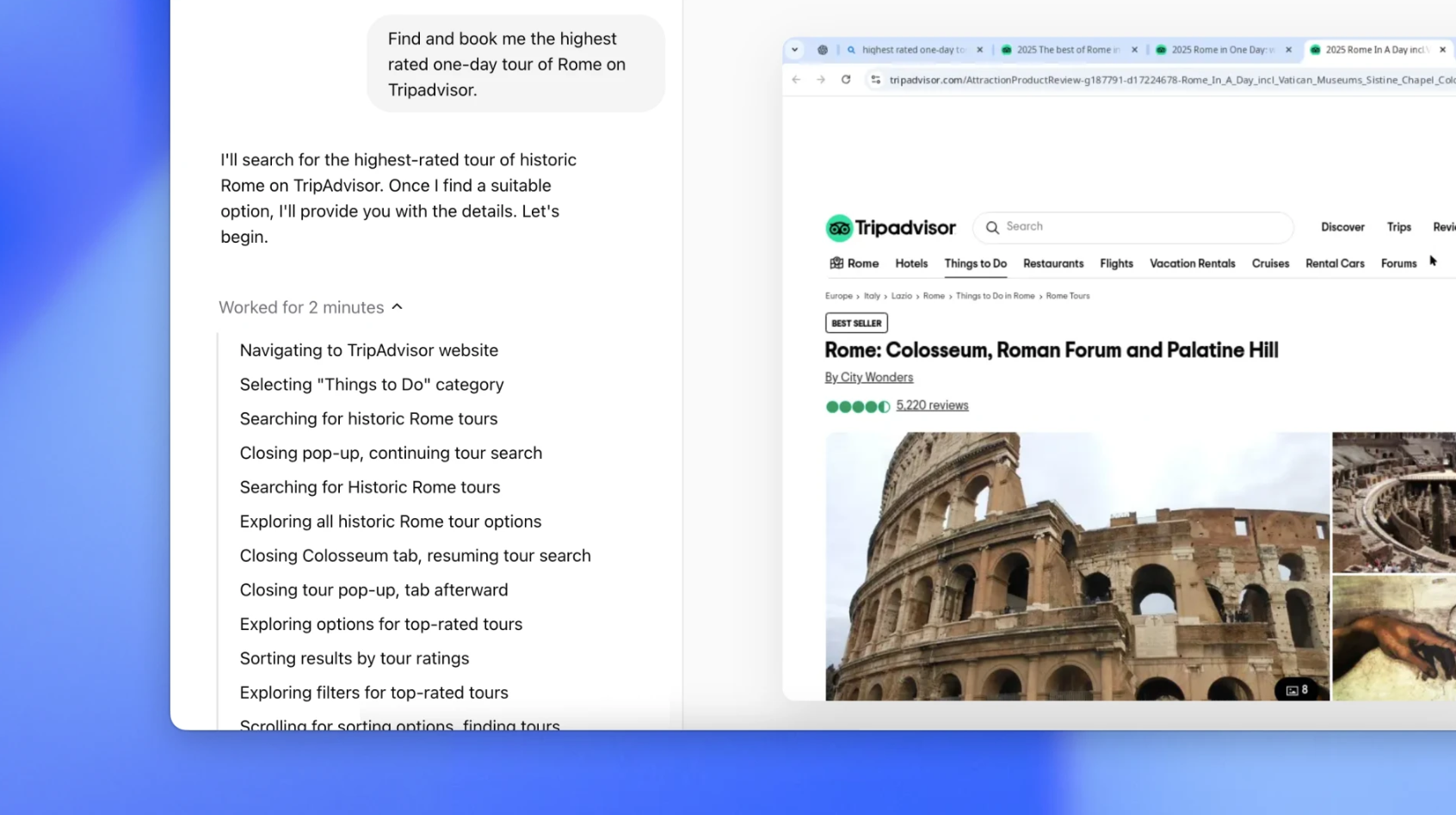 From:Introducing Operator
-
Anthropic Claude Computer Use: Released in October 2024, this was the first production‑grade model offering autonomous desktop control. It operates via a loop of screenshot capture, visual analysis, action planning, and virtual mouse/keyboard execution[6].
-
Google Project Mariner: Rolled out to Google AI Ultra users in May 2025. Powered by Gemini 2.0, it scores about 84.0% on ScreenSpot and 83.5% on WebVoyager[1], demonstrating strong screen understanding and web navigation capabilities.
-
Microsoft Fara‑7B: A small, agentic model purpose‑built for computer use. It visually perceives web pages and issues actions like scrolling, typing, and clicking on directly predicted coordinates, without relying on DOM trees or accessibility APIs.
-
Doubao Phone Assistant: A system‑level AI agent launched by ByteDance in December 2025 that can execute complex tasks across mobile apps. At its peak, scalpers were listing devices for nearly 5,000 RMB on Taobao[7].
The open‑source community has also been busy:
-
Mobile‑Agent‑v3 and GUI‑Owl: Among open‑source models, GUI‑Owl‑7B and the Mobile‑Agent‑v3 framework achieve state‑of‑the‑art results, reaching around 66.4% and 73.3% success on AndroidWorld and up to 37.7% on OSWorld‑Verified[8].
-
Browser Use: An open‑source browser automation framework that lets you plug in different models via API keys. Although much of its usage is still in non‑GUI–centric tasks, it has contributed greatly to the broader ecosystem and helped catalyze exploration of GUI‑heavy scenarios.
A Moment of Doubt
It’s true that by 2026, there has been some pushback on GUI agents in academia. You’ll see posts on Twitter/X saying “GUI agent is too crowded, not a good area for papers anymore,” and you can indeed observe some researchers pivoting away.
Industry observers are also asking: Can GUI agents ever truly land in production, or have we already hit a ceiling?
Why I’m Still Bullish on GUI Agents
Here are my reasons.
1. GUI Truly Mirrors Human–Computer Interaction — and Breaks CLI’s Hard Limits
This is the most important reason I’m bullish on GUI agents.
CLI and API‑based approaches share a fundamental limitation: once a system exposes neither structured interfaces nor any way to inject scripts via DOM/HTTP, leaving “look at the screen and move the mouse” as the only control channel, traditional CLI approaches are nearly powerless. This is especially true in security‑sensitive environments, which intentionally only allow access via remote desktop or native GUI clients, with no programmable API.
Consider this common enterprise scenario: the core financial system runs on an internal virtual machine. Employees must first log into a Windows remote desktop, then open a decades‑old thick‑client application to approve reimbursements and export reports. There is no public API, no opportunity to inject scripts into a browser page, and you don’t even have access to the DOM. In such setups, CLI or HTTP‑level automation is almost impossible. A GUI agent, however, can operate directly inside the remote desktop, “seeing the screen → moving the mouse → clicking menus → filling forms → exporting reports,” completing the workflow just like a human.
This illustrates the essence of GUI agents: they can, in principle, do anything a human can do on a computer. Clicks, keystrokes, dragging, scrolling, dropdowns — all of these are part of the basic action space.
In more abstract terms, a GUI agent is a universal interface for computer operation. It doesn’t depend on specific APIs; it interacts directly with the graphical interface. That implies:
- It can operate any software: Word, Excel, Photoshop, or some obscure tool you just downloaded. Crucially, this means the agent maintainer doesn’t have to manually extend integrations for every new app or website.
- It can adapt to any website: Even a personal blog or forum with no API can be automated.
- It can work across applications: App and OS UI design patterns are highly similar, which allows GUI agents to generalize across apps and even across platforms more naturally than task‑specific CLI scripts.
As Anthropic puts it when discussing Computer Use: “We are teaching Claude general computer skills—enabling it to use the same interfaces, applications, and workflows that humans use every day.”[6]
2. In Some Domains, GUI Agents Offer a Strictly Better Experience
GUI agents aren’t just “more general.” In certain scenarios, they actually provide significantly better user experience.
-
Cross‑app visual workflows
Imagine the following workflow: “Open a 50‑page PDF investment report from email, extract all red‑highlighted metrics into a local Excel template to generate charts, then screenshot the charts and send them to a ‘Investment Decisions’ channel in enterprise WeChat.” This involves jumping across a mail client, PDF viewer, Excel, and a chat app — while also requiring strong visual judgment: identifying “red highlights” and checking whether the charts “look reasonable.” Implementing this purely with CLI scripts is extremely painful; a GUI agent can do it the way a human would: looking at the screen and taking actions step by step. -
Heavily visual creative/design workflows
Tools like Figma, Photoshop, and Premiere are full of fuzzy, subjective commands — “tighten the layout a bit,” “brighten the subject without overexposing,” and so on. These goals are hard to encode into fixed APIs. A GUI agent can iteratively adjust the UI — dragging, aligning, tweaking sliders — while visually comparing intermediate screenshots to converge toward what the human considers “good.” -
Workflows that require strong visual confirmation
Sometimes we only trust the result once we’ve seen it. For example, when an AI bulk‑updates configuration in an admin console, we often want it to verify that “all rows turn into green checkmarks” or “a ‘Publish successful’ toast appears in the top‑right corner” before considering the task done. GUI agents can directly compare screenshots to detect these visual signals instead of relying solely on HTTP status codes. -
Cross‑app handling of unstructured content
When you want AI to pull information from scanned contracts, handwritten forms, or photos and then fill it into a browser form, a desktop ERP client, and a local Excel sheet, the entire workflow is essentially “understand unstructured visual content → operate multiple GUIs.” You can’t reasonably expect every system in that chain to expose clean APIs; a GUI agent can handle the whole pipeline purely via “see + act.”
And, importantly, these are just the applications I can think of now. There are many more scenarios waiting to be discovered and defined.
3. The Environment Is Becoming Increasingly Favorable for GUI Agents
Beyond structural advantages, the surrounding ecosystem is moving in a direction that favors GUI agents.
Visual Grounding Is Rapidly Improving
On ScreenSpot‑Pro, a particularly challenging grounding benchmark, early general multimodal models achieved only 18.9% accuracy[4]. Subsequent methods using visual search and cropping raised accuracy into the 40%+ range. RegionFocus then pushed Qwen2.5‑VL‑72B up to 61.6% on ScreenSpot‑Pro[9]. In 2026, UI‑Venus 1.5 further improved this to 69.6%[12].
Given that ScreenSpot‑Pro focuses on professional high‑resolution software — 23 applications across 5 industries and 3 operating systems — these gains are remarkable. Even humans can find many of these UIs tricky.
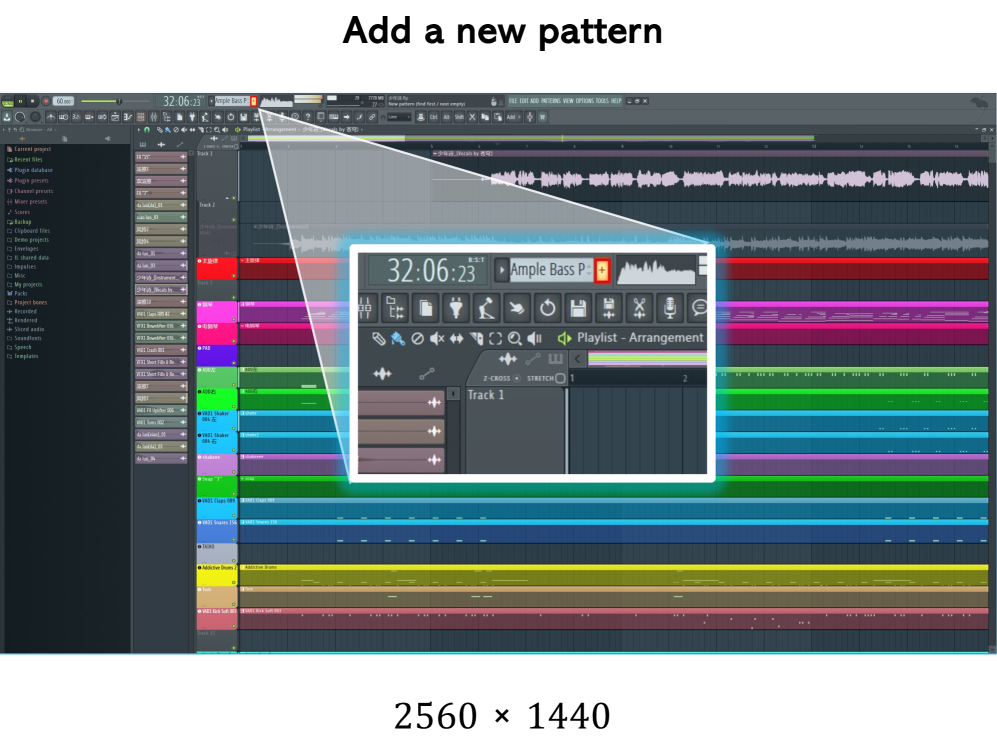 This is a task example from this benchmark. Even real human can not find the answer easily!
From:Li et al., “ScreenSpot-Pro: GUI Grounding for Professional High-Resolution Computer Use”, 2025
This is a task example from this benchmark. Even real human can not find the answer easily!
From:Li et al., “ScreenSpot-Pro: GUI Grounding for Professional High-Resolution Computer Use”, 2025
On the agent side, open‑source models are quickly closing the gap:
- GUI‑Owl‑7B achieves about 66.4% on AndroidWorld;
- Mobile‑Agent‑v3 boosts this to 73.3% and about 37.7% on OSWorld‑Verified[8];
- UI‑Venus 1.5 now reaches around 77.6% on AndroidWorld[12].
Agentic Capabilities Are Exploding
2025 was also a breakout year for agent‑like capabilities more broadly. OpenAI’s o1/o3 series, Anthropic’s Claude 4 Sonnet, and Google’s Gemini 2.5 all demonstrate impressive reasoning and planning skills. For GUI agents, these abilities are critical: operating a computer isn’t just about “seeing” — it’s also about “figuring out what to do.”
Academic Work Is Generating Valuable Insights
Over the past year, GUI‑agent research has yielded a lot of actionable insights:
- WorldGUI reveals how fragile agents can be when starting from non‑default states[3].
- FineState‑Bench shows that even top models only reach 32.8% accuracy on fine‑grained interactions[5].
- Other studies analyze how screenshot resolution, trajectory history, and other factors influence VLM behavior in digital‑agent tasks[2].
These findings clarify where the bottlenecks lie and point toward concrete directions for improvement.
GUI Agents Don’t Exist in Isolation
This part is crucial: GUI agents sit on top of progress in LLMs, multimodal models, inference frameworks, and data. That means:
-
When LLMs get better, GUI agents get an automatic upgrade.
Stronger reasoning and planning directly translate into better navigation and error recovery. -
When multimodal models improve at “looking,” GUI agents perceive GUIs more accurately.
-
When the underlying applications themselves improve, GUI agents often benefit too.
For instance, more consistent UI design or better in‑app search can make agents more reliable.
In other words, GUI agents ride on the shoulders of giants. Every step forward in the underlying stack automatically makes GUI agents more capable, which is a very favorable long‑term position.
Challenges and Opportunities
Of course, GUI agents face serious challenges:
-
Stability: Current GUI agents still fail too often on complex tasks. WorldGUI shows that even state‑of‑the‑art agents degrade significantly when starting from non‑default states[3].
-
Fine‑grained control: FineState‑Bench demonstrates that models still struggle with precise operations such as selecting exact colors or highlighting a specific span of text[5].
-
Inference cost: GUI agents repeatedly capture screenshots, analyze them, and re‑plan actions. Token usage is much higher than in pure text interaction, which is a real concern at scale.
-
Security risk: Letting an AI control your computer is inherently risky, especially through GUI control. Anthropic’s Computer Use, for example, incorporates multiple safety layers — classifiers such as ASL‑3, sandboxing, and real‑time monitoring[10].
Personally, I see these more as opportunities than blockers. Every unsolved problem is a potential research direction — and a potential product opportunity.
My Experiment: Auto‑Cursor
At the end of 2025, I started a small demo project: Auto‑Cursor.
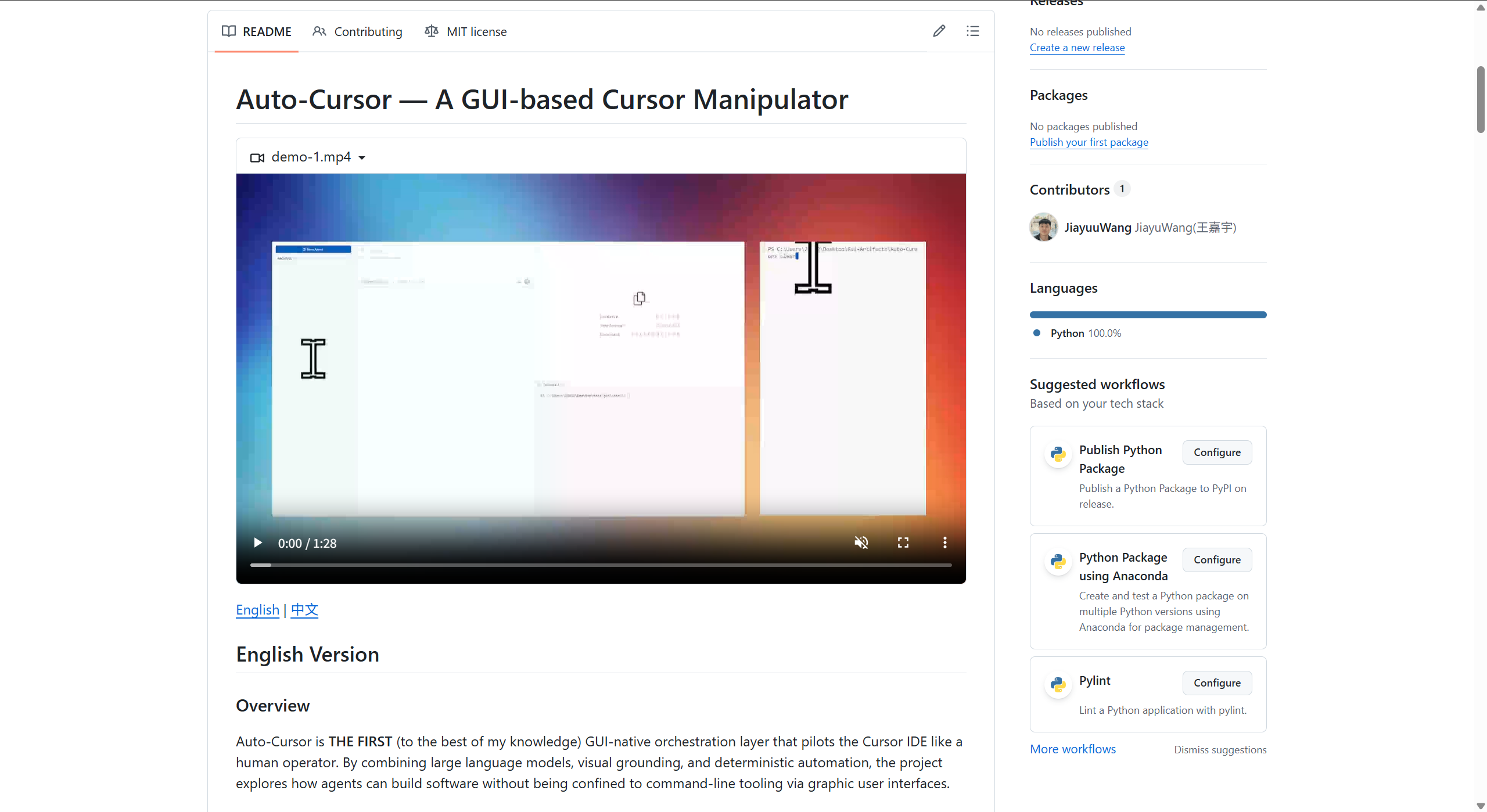 From:Auto-Cursor: A GUI Agent for Cursor IDE
The motivation is straightforward: extend the usage scenarios of GUI methods by letting an agent operate the Cursor IDE itself via GUI.
The idea is to let AI autonomously operate Cursor to achieve automated programming. You just specify a goal — for example, “turn this page’s CSS into a dark theme” — and it will analyze the code, then use Cursor’s UI to apply changes and run tests.
This directly leverages the first GUI‑method advantage discussed above: breaking through API limitations. Cursor exposes plenty of powerful interfaces (such as retrieving user and team activity), but it intentionally does not allow scripts to control in‑app operations. GUI control is the natural way to go beyond those boundaries.
The project is still a rough demo with many limitations, but it already hints at what GUI agents could do in software engineering.
Conclusion
From a “paper‑publishing” standpoint, GUI agents may no longer be the hottest growth area. But in the long run, I believe the upside is enormous.
I’m not keen to claim that “GUI agents are the path to AGI” — the term AGI is already overused and poorly defined. What I do believe is that GUI agents will become a powerful way of working and will reshape multiple industries.
Just as CLI once replaced batch processing, and GUI later replaced pure CLI for mainstream users, AI‑driven interface control is likely to be the next paradigm shift in human–computer interaction — and GUI agents are at the forefront of that shift.
References
[1] Zylos Research – Computer Use and GUI Agents in 2026: State of the Art (https://zylos.ai/research/2026-02-08-computer-use-gui-agents)
[2] OSWorld – Benchmarking Multimodal Agents for Open‑Ended Tasks in Real Computer Environments (https://os-world.github.io/)
[3] WorldGUI – An Interactive Benchmark for Desktop GUI Automation (https://arxiv.org/html/2502.08047v4)
[4] ScreenSpot‑Pro: GUI Grounding for Professional High‑Resolution Computer Use (https://arxiv.org/html/2504.07981v1)
[5] FineState‑Bench: A Comprehensive Benchmark for Fine‑Grained State Control in GUI Agents (https://arxiv.org/html/2508.09241v1)
[6] Anthropic Computer Use API Documentation (https://www.digitalapplied.com/blog/anthropic-computer-use-api-guide)
[7] Jiqizhixin – “Why ‘Doubao Phone’ Went Viral as a Super Agent” (https://news.qq.com/rain/a/20251210A056UI00)
[8] Mobile‑Agent‑v3: Fundamental Agents for GUI Automation (https://arxiv.org/abs/2508.15144)
[9] RegionFocus: Visual Test‑time Scaling for GUI Agent Grounding (https://arxiv.org/html/2505.00684v2)
[10] Bosio Digital – The Agent Arms Race (https://bosio.digital/articles/agent-arms-race-openai-anthropic-google)
[11] Awesome Agents – Cursor Launches Always‑On AI Coding Agents (https://awesomeagents.ai/news/cursor-automations-agentic-coding-agents/)
[12] UI‑Venus‑1.5 Technical Report & GitHub (https://github.com/inclusionAI/UI-Venus)